 FREE SHIPPING: 2-3 day delivery for all U.S. orders
A multi-adapter tether secures two to four adapters or leads to one cable or anchor point. It suits rooms where one display cable has to work with several laptop types, since the adapters travel together and stay with the cable. The standard model is 16 inches of wire, which becomes about 8 inches once installed.
What a multi-adapter tether does
A standard tether joins one adapter to one cable. A multi-adapter tether has extra loops, so several adapters hang from one anchor. In a conference room the cable from the display ends in a cluster: one adapter for older VGA laptops, one for HDMI, one for USB-C. The adapters stay attached, and users pick the one they need.
Two Amazon reviewers describe this setup. One needed to secure multiple HDMI adapters so they stayed accessible in a room and did not turn up in another. The other worked at a company that had just updated its laptops, so the room’s VGA cable now had to work with some machines that had USB-C or HDMI. They knew the adapters “would walk away” and bought one set to test before buying more.
Which adapters pair well
Pair adapters that serve one display cable, such as VGA plus USB-C or HDMI plus USB-C. With a mix of ports on one cable, every visitor can connect without hunting for a dongle.
Healthcare facilities also use multi-adapter tethers to hold several leads to a single device, so cables stay with the equipment they belong to. See our guide on hospital and medical equipment for how those settings use tethers.
Models and sizes
| Standard multi-adapter | Non-metal multi-adapter (MFSF-16-MA2) | |
|---|---|---|
| Adapters per tether | Two to four | Two |
| Length | 16 inches of wire, about 8 inches installed | 16 inches, about 8 inches installed |
| Colors | Black, white, silver | Clear |
| Wire | Stainless steel | Non-metal, does not conduct electricity |
Multi-adapters come in standard and heavy-duty strengths. The standard vs heavy-duty guide explains the ratings, and the buying guide lists every option. Custom lengths are available through the custom order page.
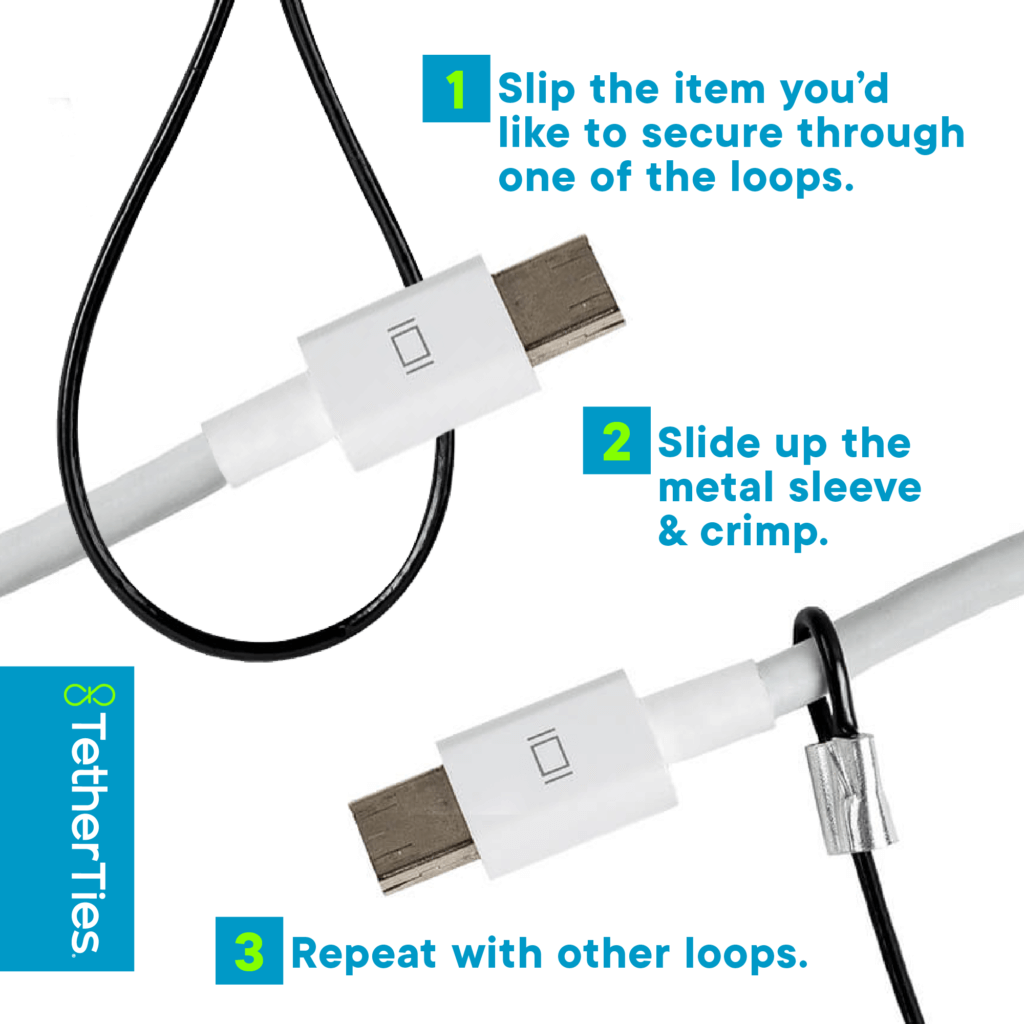
Installing a multi-adapter tether
The crimp steps match the single tethers, with one loop per adapter. Slide each loop over its adapter and crimp it. Then fix the anchor loop to the display cable and crimp that sleeve tight. The crimping guide has the video and troubleshooting.
When to use a single tether instead
If each adapter lives on its own cable, use single tethers. If a room has one display cable and several adapters, a multi-adapter tether cuts the clutter: fewer wires on the table, and one pass to install. For a full room setup, see the conference room guide.
Questions people ask
How many adapters can one tether secure?
The standard multi-adapter tether secures two to four adapters or leads. The non-metal model secures two.
How long is a multi-adapter tether?
16 inches of wire, about 8 inches once installed.
Can I get one in a custom length?
Yes. Use the custom order page.
Where can I buy one?
Order the multi-adapter tether or the non-metal two-adapter version.